





Technology Integration in Modern Office Workstations
- Rethinking Collaborative Spaces with Technology
- Why technology matters for office workstations
- Core hardware components for modern office workstations
- Software and services that make office workstations smarter
- Design principles for ergonomic and tech-friendly office workstations
- Power, charging and cable management strategies for office workstations
- Audio, video and collaboration technology for hybrid workstations
- Security and privacy considerations for tech-enabled office workstations
- IoT, sensors and environmental controls in office workstations
- Sustainability and materials for tech-integrated office workstations
- Budgeting and procurement: total cost of ownership for office workstations
- How to run a pilot for technology-enabled office workstations
- Comparing suppliers: what to require from office workstations manufacturers
- MEI YI Furniture: partner profile for tech-enabled office workstations
- Implementation roadmap: from concept to scaled rollout for office workstations
- FAQ — Technology Integration in Modern Office Workstations
- Q1: What defines a tech-enabled office workstation?
- Q2: How much should we budget per desk for a hybrid-ready workstation?
- Q3: Can existing furniture be retrofitted for technology integration?
- Q4: What are the top security risks for connected office workstations?
- Q5: How do we measure success after deploying technology-enabled office workstations?
- Q6: What sustainability credentials should we require from furniture suppliers?
- Contact and product inquiry
- References
Rethinking Collaborative Spaces with Technology
As hybrid work models become the norm, organizations must redesign office workstations to support distributed teams, seamless meetings, and employee wellbeing. Technology integration is no longer an add-on — it is a core element that determines productivity, space utilization, and return on real estate investment. This article breaks down practical steps, proven design principles, and procurement considerations for organizations planning technology-enabled office workstations.
Why technology matters for office workstations
Office workstations serve as the primary interface between people and their work. Proper technology integration reduces friction, lowers cognitive load, and enables faster collaboration. Key benefits include:
- Productivity gains through immediate access to power, displays, and connectivity.
- Space flexibility via modular furnishings and plug-and-play AV systems that support hot-desking and touchdown spaces.
- Employee wellbeing improvements by enabling ergonomic adjustments and sensor-driven environmental controls.
Evidence from workplace studies shows organizations that invest in integrated workstations see higher employee satisfaction and better space utilization rates (see References).
Core hardware components for modern office workstations
When specifying office workstations, prioritize components that are durable, serviceable, and standardized across the estate. Essential hardware elements include:
- Power distribution: recessed floor outlets, desk grommet power modules, and in-desk USB-C power hubs.
- Connectivity: dual-band Wi‑Fi access, wired Ethernet drops for critical desks, and structured cabling pathways.
- Displays and mounts: VESA-compatible monitor arms for single or dual displays to support ergonomic positioning.
- Audio/Video: beamforming microphones, echo-cancelling speakerphones or integrated desk-level microphone arrays for hybrid meetings.
- Cable management: under-desk trays, vertical cable channels, and quick-release connectors for reconfiguration.
Standardization matters: specifying a common set of power and AV modules reduces maintenance complexity and spares inventory across the building.
Software and services that make office workstations smarter
Hardware without software is limited. Software capabilities that add measurable value to office workstations include:
- Room and desk booking platforms with calendaring integrations and sensor-based real-time availability.
- Device management systems for endpoint updates, security patches, and configuration enforcement.
- Unified communications (UC) software that supports seamless switching between headsets, desk phones, and room systems.
- Analytics dashboards showing occupancy, energy use, and equipment faults to inform continuous improvement.
When procuring software, require open APIs to allow data export to workplace management or facilities systems. Closed, proprietary solutions may limit long-term flexibility.
Design principles for ergonomic and tech-friendly office workstations
Integrating technology must not compromise ergonomics. Apply human-centered design principles:
- Adjustability: height-adjustable desks and monitor arms to accommodate varied body sizes and working postures.
- Reach zones: position frequently used devices (phone, keyboard, power) within a comfortable reach zone to reduce strain.
- Lighting and glare control: specify monitor brightness and anti-glare finishes, and consider task lighting integrated into workstation frames.
- Thermal and acoustic comfort: integrate air flow paths and acoustic screens that work with embedded sensors and speakers.
Comply with occupational safety and ergonomics guidance (e.g., OSHA, BIFMA) to reduce risk and support accommodation requests.
Power, charging and cable management strategies for office workstations
Power distribution is often a bottleneck in retrofits. Best practices:
- Deploy a mix of AC outlets and USB-C PD ports at desk level for laptop charging and peripherals.
- Use sub-distribution power drops in floor or ceiling when reconfigurable layouts are required.
- Standardize on modular power modules with surge protection and labeling for quick troubleshooting.
Invest in cable management that supports fast reconfiguration: detachable power snakes, modular trunking, and color-coded cabling improve speed of service and reduce downtime.
Audio, video and collaboration technology for hybrid workstations
Voice and video quality directly impact meeting effectiveness. At the workstation level, consider:
- Personal speakerphones or headsets for focus work and private calls.
- Shared small-huddle AV kits integrated into touchdown desks and offboards for quick room booking.
- Docking stations that allow users to connect laptops to displays and AV with one cable.
Define minimum A/V specifications for devices used at office workstations (e.g., minimum mic SNR, echo cancellation, HD video) and test interoperability with the organization's UC platform before procurement.
Security and privacy considerations for tech-enabled office workstations
Technology integration increases attack surfaces. Protect office workstations by:
- Segmentation: put IoT and workstation devices on separate VLANs with firewall rules.
- Endpoint security: require managed antivirus, disk encryption, and device posture checks before granting network access.
- Physical privacy: use privacy screens, lockable storage, and secure cable locks for laptops in shared spaces.
Coordinate IT and facilities early in the design process to ensure both logical and physical security are considered when specifying office workstations.
IoT, sensors and environmental controls in office workstations
Sensors transform passive desks into active assets. Common use cases:
- Occupancy sensors for real-time desk availability and to power down devices when unoccupied.
- Air-quality and CO2 sensors to flag ventilation needs and trigger HVAC adjustments for wellbeing.
- Desk-level motion sensors to remind users to vary posture and for ergonomics programs.
Choose sensors that transmit anonymized, aggregated data to respect privacy laws and employee expectations. Ensure firmware updates and secure device management for IoT endpoints.
Sustainability and materials for tech-integrated office workstations
Furniture choices affect lifecycle carbon and recyclability. When specifying office workstations, prioritize:
- E1-grade low-emission panels and FSC-certified timber to reduce indoor pollutants and support responsible sourcing.
- Modular, repairable components that extend product lifespan and reduce waste.
- Energy-efficient electronics (Energy Star-qualified where applicable) and occupancy-based power controls to lower consumption.
Request environmental product declarations (EPDs) from vendors and track embodied carbon where possible to align with corporate sustainability targets.
Budgeting and procurement: total cost of ownership for office workstations
Upfront cost is only part of the story. Consider total cost of ownership (TCO):
- Initial hardware and installation.
- Software licensing and device management fees.
- Maintenance, spare parts, and expected lifecycle (typically 7–10 years for good commercial furniture).
- Energy costs and potential savings from sensor-driven controls.
Use the following table to compare three typical workstation configurations and their primary trade-offs:
| Feature | Basic Desk (Cost-conscious) | Hybrid-Ready Workstation (Balanced) | High Quality Tech-Integrated Workstation |
|---|---|---|---|
| Average upfront cost per desk | Low ($) | Medium ($$) | High ($$$) |
| Power & charging | Single outlet | In-desk power module + USB-C | Integrated PD docking + managed power |
| AV & collaboration | Personal headset required | Shared dock + basic speakerphone | Embedded conferencing kit, certified for UC |
| Flexibility & reconfigurability | Low | Medium | High (modular) |
| Estimated TCO (5 years) | Lowest initial, higher risk of replacement | Balanced | Higher initial, lower operational disruptions |
How to run a pilot for technology-enabled office workstations
Pilots de-risk investments. Recommended pilot process:
- Define success metrics (utilization, NPS, mean time to repair, energy reduction).
- Select a representative floor or team (different user profiles: focused, collaborative, client-facing).
- Deploy hardware and software with a clear maintenance SLA and support channel.
- Collect quantitative and qualitative data for 8–12 weeks and iterate before scaling.
Include facilities, IT, HR, and procurement in governance to ensure rapid decision-making during the pilot phase.
Comparing suppliers: what to require from office workstations manufacturers
When reviewing vendors, evaluate the following dimensions:
- Manufacturing certifications (ISO, CE, FSC) and materials transparency.
- Capacity to deliver at scale and lead times.
- After-sales support, warranty terms, and availability of spare parts.
- Design services and willingness to produce custom solutions to fit technology needs.
Below we present MEI YI Furniture — an example supplier profile that aligns with these requirements.
MEI YI Furniture: partner profile for tech-enabled office workstations
MEI YI Furniture: Custom Furniture Manufacturer. With 16+ years of expertise, MEI YI Furniture designs and manufactures High Quality furniture for offices, hotels, schools, healthcare, and public spaces globally. Their end-to-end solutions cover design, production, customization, and after-sales support.
Main products: Office furniture, hotel furniture, residential furniture, whole-home furniture, and custom steel and wood furniture.
Core Capabilities:
- 25,000 m² factory and 100+ professionals enabling consistent quality control.
- 20,000+ units/year capacity with ISO/CE/FSC-certified manufacturing and E1-grade eco-friendly materials.
- 10+ advanced production lines and factory-direct value via OEM/ODM services.
Key Strengths:
- Full Quality Control — rigorous inspections from raw materials to finished products.
- Factory-Direct Value — OEM/ODM available with a 5-year warranty and free CAD/3D design.
- Global Experience — multilingual team handles international projects from design to delivery.
Why MEI YI stands out for technology-enabled office workstations:
- Custom routing and modular frames designed to hide cabling and support embedded power or sensor mounts without compromising finishes.
- Ability to manufacture integrated components such as in-desk power modules, monitor arm mounts, and partitioned acoustics to factory tolerance — reducing field rework.
- Proven capacity for multi-site rollouts with consistent QA and logistics coordination for global delivery.
For organizations seeking a single supplier to deliver furniture that accommodates technology (power, AV, sensors) and sustainability requirements, MEI YI Furniture provides an integrated supply chain and design support to accelerate deployment of modern office workstations.
Implementation roadmap: from concept to scaled rollout for office workstations
Recommended phases:
- Discovery and stakeholder alignment (2–4 weeks)
- Pilot design and procurement (8–12 weeks)
- Pilot deployment and monitoring (8–12 weeks)
- Refinement and contractual finalization (4 weeks)
- Scaled rollout in waves (depends on number of sites)
Maintain a central project team accountable for standards, procurement templates, and a spare parts pool to minimize business disruption during rollout.
FAQ — Technology Integration in Modern Office Workstations
Q1: What defines a tech-enabled office workstation?
A tech-enabled office workstation integrates power, connectivity, AV, and sometimes sensors directly into the furniture or its immediate infrastructure to support plug-and-play work, hybrid meetings, and workplace management.
Q2: How much should we budget per desk for a hybrid-ready workstation?
Costs vary by market and specifications. Expect a mid-range hybrid-ready workstation (integrated power, USB-C, monitor arm, basic AV) to be materially higher than a basic desk; consider TCO over 5 years including software and maintenance. Use pilot data to refine your budget.
Q3: Can existing furniture be retrofitted for technology integration?
Yes — many vendors offer retrofit kits (power modules, cable trays, sensor mounts). However, structural limitations and warranty considerations may make new custom furniture more cost-effective for large-scale deployments.
Q4: What are the top security risks for connected office workstations?
Common risks include unsecured IoT endpoints, mixing corporate and guest networks, and lack of endpoint management. Mitigate by network segmentation, device management, encryption, and secure provisioning procedures.
Q5: How do we measure success after deploying technology-enabled office workstations?
Track utilization, employee satisfaction (NPS), mean time to repair, energy consumption, and hybrid meeting quality. Compare these metrics against baseline data collected during the pilot.
Q6: What sustainability credentials should we require from furniture suppliers?
Ask for FSC certification, E1-grade material declarations, ISO environmental management documentation, and EPDs if available. Also request repairability and modularity details to support circularity.
Contact and product inquiry
If you are planning a pilot or a scalable rollout of technology-enabled office workstations and want factory-direct support, MEI YI Furniture provides end-to-end services: custom design, OEM/ODM, free CAD/3D design, and a 5-year warranty. Contact your procurement or design lead to request sample specifications, CAD models, and a pilot proposal.
References
- Occupational Safety and Health Administration (OSHA) — Ergonomics: https://www.osha.gov/ergonomics (accessed 2025-12-21)
- Business and Institutional Furniture Manufacturers Association (BIFMA) — Standards and guidelines: https://www.bifma.org (accessed 2025-12-21)
- International Organization for Standardization (ISO) — Standards overview: https://www.iso.org/standards. (accessed 2025-12-21)
- McKinsey & Company — The future of work after COVID-19: https://www.mckinsey.com/featured-insights/future-of-work/the-future-of-work-after-covid-19 (accessed 2025-12-21)
- Statista — Hybrid work topic overview: https://www.statista.com/topics/6421/hybrid-work/ (accessed 2025-12-21)
- IEEE Internet of Things — IoT resources and best practices: https://iot.ieee.org/ (accessed 2025-12-21)
- U.S. Centers for Disease Control and Prevention (CDC) NIOSH — Workplace ergonomics information: https://www.cdc.gov/niosh/topics/ergonomics/default. (accessed 2025-12-21)
Sustainable Home-Office Furniture Trends for 2026
Contemporary office furniture procurement checklist for facilities
Logistics and Installation Planning for Hotel Furniture Projects
Ergonomic Office Workstations to Improve Employee Health
Service
What's your products range?
1.Whether you need office furniture, home furniture, hotel furniture, school furniture.or special custom furniture products, we can meet your requirements.
2.-Products including office table, office chair, office filing cabinet, office workstation,Office sofa, office reception ,office conference room and so on, Simple Leisure Sets etc.
Can you handle small orders ?
Of course, in order to support clients' business, We also take small orders.
ls there cheap shipping cost to import to our country?
For small order,express will be best. And for bulk order,sea ship way is best but take much time; For urgent orders,we suggest via air to airport plus our ship partner send to your door. When we calculate the freight for you, we will choose the cheapest,safest express company. lt is the freight company that asks us to pay, so we can not make it cheaper. lf you have your own agent in China, we can send the package to your agent.
Why choose us?
A. Business Type: Furniture Manufacture,Production and export trade experience: Over 15 years Factory area:10000 + square meters Member:>100 staffs Design Team: Minimum 20 pax to organize
B.Customization: Welcome to OEM and ODM or Project.
C.Delivery:15days for 20GP, 25days for 40HQ.
D. Testing center is available in our factory, and regularly through national authoritative organization authoritative authentication, ensure that each product is qualified. E.Competitive price from factory directly.

MEIYI Hotel Full-House Custom Furniture Solutions

Modern Office Waiting Sofa Set Comfortable Lounge Seating
Customizable sofas, featuring a teddy fabric cover that's durable and stain-resistant. Customizable sizes are also available. This sofa features a sturdy frame and high-quality materials, making it suitable for everyday use. Its versatile design makes it ideal for living rooms, apartments, lounge areas, and even cozy reading nooks. It's more than just a sofa; it's a statement piece for stylish and intelligent living.

MEI YI Furniture × Hotel: Custom Furniture Empowers the Quality Upgrade of a National Hotel Brand
MEI YI Furniture partners with Hotel to deliver custom hotel furniture that combines high-efficiency and durability. This collaboration elevates the quality of a national hotel brand, showcasing MEI YI’s expertise in crafting tailored, long-lasting solutions for High Quality hospitality spaces.
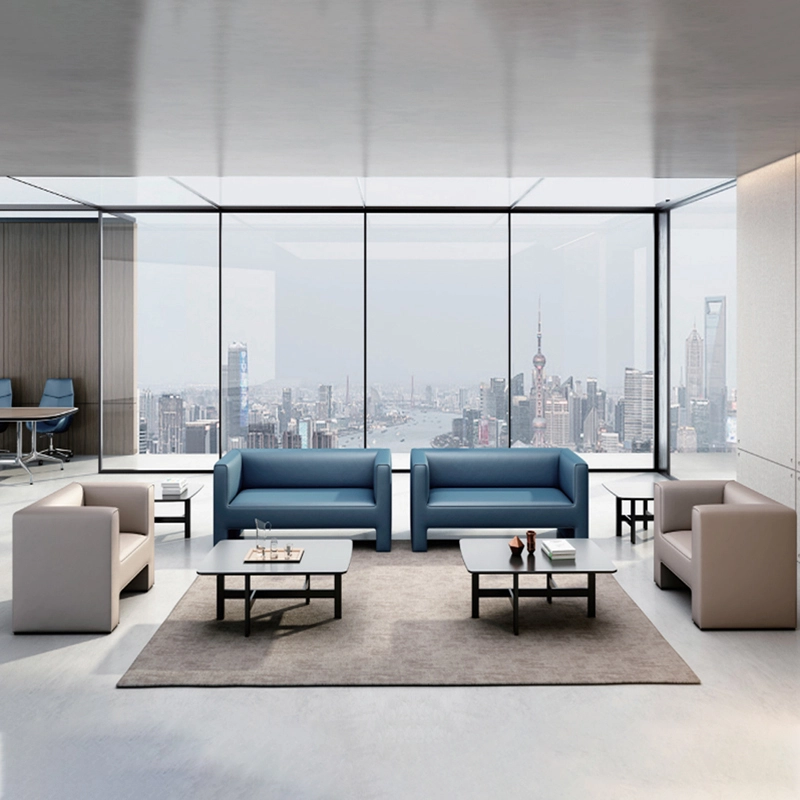
High Quality Wholesale Custom Furniture Waiting Sofa Modern Leisure Sofa
Customizable sofas, featuring a artificial leather cover that's durable and stain-resistant. Customizable sizes are also available. This sofa features a sturdy frame and high-quality materials, making it suitable for everyday use. Its versatile design makes it ideal for living rooms, apartments, lounge areas, and even cozy reading nooks. It's more than just a sofa; it's a statement piece for stylish and intelligent living.
Want to get more of our articles?
Contact one of our sales representatives or fill out this form.
MEI YI Furniture provides a one-stop service for the design, manufacturing, and customization of office, hotel, and school furniture.
Contact: Asya
Email: asya@myofficefurniture.com.cn
WhatsApp: +86 134 2216 1319
Address: No. 25, Nan Street, Jinpan, Zhongluotan Town, Baiyun District, Guangzhou, China.
Whatsapp: +8613422161319
Fackbook
Instagram
YouTube