





Health & Productivity Metrics Linked to Workstations
- Why office workstations design matters
- How office workstations affect worker health: core metrics to monitor
- Productivity metrics that respond to office workstations
- How to measure both health and productivity realistically
- Comparing sitting, sit–stand and active office workstations
- Design principles for office workstations that improve metrics
- ROI considerations: how to build a business case for workstation upgrades
- MEI YI Furniture: custom solutions for healthier, productive office workstations
- How MEI YI’s solutions align with measurable workplace goals
- Implementation checklist and dashboard template for office workstations
- Frequently Asked Questions (FAQ)
- 1. How quickly will new office workstations reduce back or neck pain?
- 2. Do sit–stand desks actually increase productivity?
- 3. What is the cheapest effective investment to improve workstation metrics?
- 4. How should we measure productivity without invading privacy?
- 5. Can furniture alone solve workplace health problems?
- Contact and next steps
- References
Why office workstations design matters
The physical environment of knowledge work—especially office workstations—directly shapes employee health, comfort, and performance. Poorly designed workstations increase musculoskeletal disorders, contribute to prolonged sedentary time, and can subtly degrade concentration and cognitive functioning. Conversely, ergonomically designed, adjustable, and context-aware workstations can reduce pain, lower absenteeism, and support more productive work patterns. Below we synthesize evidence-based metrics to monitor, practical design principles, and implementation guidance for facility managers and business leaders seeking measurable gains.
How office workstations affect worker health: core metrics to monitor
Health outcomes linked to office workstations are measurable and fall into several categories. Tracking the right combination of subjective and objective metrics allows employers to detect problems early and quantify improvements after interventions.
- Musculoskeletal symptoms: self-reported prevalence and severity of neck, shoulder, upper- and lower-back pain (e.g., visual analogue scales, Nordic Musculoskeletal Questionnaire scores).
- Sedentary time and physical activity: average daily sitting hours, number of prolonged sitting bouts (>30–60 minutes), steps per workday (wearables or badge sensors).
- Cardiometabolic markers (where health monitoring is available): resting heart rate, blood pressure, glucose markers (usually part of employee health programs).
- Absenteeism and short-term disability: days lost per 100 employees attributable to musculoskeletal or general health causes.
- Healthcare utilization: claims, physical therapy visits, or occupational health referrals related to workstation injuries.
Sources such as the World Health Organization and occupational safety authorities emphasize musculoskeletal conditions and physical inactivity as major workplace health concerns, reinforcing the value of tracking these metrics systematically (see references).
Productivity metrics that respond to office workstations
Productivity is multi-dimensional; to link outcomes to office workstations, choose metrics that reflect both individual output and organizational performance. Key metrics include:
- Time-on-task and focused work duration: measured via software telemetry, self-reports, or observational studies.
- Task accuracy and error rates: relevant in data-entry and quality-control roles.
- Throughput or outputs per unit time: units completed, cases closed, or deliverables produced per day/week.
- Engagement and presenteeism: validated survey scores (e.g., Gallup Q12) and indices of working while unwell.
- Employee turnover and recruitment metrics: resignation rates and time-to-hire for similar roles.
Multiple workplace design studies indicate that improvements in ergonomic fit, lighting, noise control, and workstation flexibility correlate with higher engagement and measurable gains in individual and team performance (see Gensler and industry research in references).
How to measure both health and productivity realistically
Integrating health and productivity measurement into a single program helps show causality. Practical steps:
- Baseline assessment: run a 4–8 week baseline gathering musculoskeletal symptom surveys, average sitting time (via wearables or self-report), absenteeism, and a chosen productivity KPI.
- Introduce a controlled intervention: e.g., new adjustable office workstations, sit–stand desks, ergonomic chairs, or targeted training. Implement in a pilot group first.
- Continuous monitoring: collect the same metrics during implementation (minimum 3 months) and at regular intervals thereafter.
- Analyze and report: use paired comparisons and, where possible, control groups to estimate effect size. Report changes in symptom prevalence, sitting time, KPI outputs, and days lost.
For privacy and compliance, aggregate health data and obtain employee consent for wearable or biometric monitoring.
Comparing sitting, sit–stand and active office workstations
Decision-makers often weigh different workstation types. The table below summarizes typical health and productivity effects reported in the literature and industry evaluations.
| Workstation Type | Typical Health Effects | Typical Productivity Effects | Evidence & Notes |
|---|---|---|---|
| Sitting-only desks | Higher sedentary time; increased risk of neck/back discomfort over time. | Neutral to negative if discomfort reduces focus; less flexibility for task variety. | Longstanding baseline in offices; occupational health authorities recommend reducing prolonged sitting (WHO, CDC). |
| Sit–stand adjustable desks | Reduced prolonged sitting, improved comfort for many users, modest benefits for lower back pain in some studies. | Often neutral to positive; improved well-being can indirectly increase focus and reduce interruptions from discomfort. | Systematic reviews show sit–stand desks reduce sitting time and may decrease musculoskeletal complaints (see reviews cited). |
| Active workstations (treadmill/bike) | Increased energy expenditure; may reduce sedentary time substantially but not suitable for all tasks. | Mixed—can reduce typing accuracy for certain tasks; better for calls and tasks requiring low fine motor skills. | Best used for specific roles or voluntary programs with acclimation periods and clear task matching. |
Sources for the table include public health guidance and ergonomics reviews (see references). Choose workstation types based on the mix of tasks, employee preferences, and measurable goals.
Design principles for office workstations that improve metrics
Workstation design should follow evidence-based ergonomics and human-centered principles. Key elements:
- Adjustability: height-adjustable desks and chairs with multiple adjustments allow individualized posture optimization.
- Display alignment: monitor tops at or slightly below eye level, 50–70 cm distance to reduce neck/eye strain.
- Input ergonomics: keyboards and mice positioned to keep wrists neutral; consider split keyboards or alternative input for high-risk users.
- Movement cues: prompts to stand or move, workplace layouts that encourage walking, and shared standing meeting spaces.
- Supportive seating: lumbar support, appropriate seat depth, and pressure-distributing materials to reduce discomfort.
- Environmental factors: lighting, acoustics, thermal comfort, and privacy significantly influence cognitive performance.
Occupational safety agencies (e.g., OSHA, NIOSH) and ergonomics centers (e.g., Cornell) provide detailed checklists and training resources for implementing these elements—use them to standardize procurement and setup.
ROI considerations: how to build a business case for workstation upgrades
To make a defensible ROI case, quantify both cost savings and productivity gains:
- Cost savings: reductions in absenteeism, fewer medical claims, lower short-term disability costs, and reduced turnover.
- Productivity gains: increased throughput, faster task completion, reduced error rates, improved engagement and retention.
- Hard-to-quantify benefits: employer brand, recruitment competitiveness, and long-term health improvements.
Example approach: estimate cost per employee of a workstation upgrade, then compare against expected reductions in days lost and conservative productivity improvements (e.g., 1–5%). Pilot studies with control groups provide the strongest ROI evidence for wider rollout.
MEI YI Furniture: custom solutions for healthier, productive office workstations
MEI YI Furniture: Custom Furniture Manufacturer — With 16+ years of expertise, MEI YI designs and manufactures High Quality furniture for offices, hotels, schools, healthcare, and public spaces globally. Their end-to-end solutions cover design, production, customization, and after-sales support. For organizations seeking measurable health and productivity improvements tied to office workstations, MEI YI offers:
- Main products: Office furniture, hotel furniture, school furniture, residential whole-home furniture, and custom steel & wood furniture.
- Core capabilities: 25,000 m² factory, 100+ professionals, 20,000+ units/year capacity, ISO/CE/FSC-certified manufacturing, E1-grade eco-friendly materials, and 10+ advanced production lines.
- Key strengths: Full quality control across production stages; factory-direct pricing and OEM/ODM options; 5-year warranty with free CAD/3D design; and a multilingual team experienced in international projects.
MEI YI’s product lines emphasize adjustability, durable materials, and configurable layouts—features directly linked to improved ergonomic fit and lower musculoskeletal complaints. Their factory-direct model helps companies pilot ergonomic office workstations at competitive cost and scale successful designs globally.
How MEI YI’s solutions align with measurable workplace goals
When procuring furniture to improve health and productivity, prioritize these attributes that MEI YI offers:
- Height-adjustable desk frames and compatible cable/monitor management for clean, ergonomic setups.
- Task chairs with multi-point adjustments and durable, test-certified components for consistent fit across staff.
- Modular systems that support activity-based work (collaboration zones, standing huddle areas, quiet focus pods).
- Custom manufacturing to align furniture footprint with sensor placement and workplace analytics needs.
By selecting a vendor able to deliver design-to-delivery services, organizations reduce implementation friction and ensure standards are met across locations—a prerequisite for reliable metric tracking and ROI calculation.
Implementation checklist and dashboard template for office workstations
Use this quick checklist for pilot rollouts and a simple dashboard metric set to track outcomes:
- Baseline surveys: musculoskeletal symptoms (weekly), well-being surveys (monthly).
- Objective activity: average sitting time and steps (weekly aggregate from wearables or voluntary apps).
- Productivity KPI: choose one clear output metric per team (e.g., cases closed/day).
- Absenteeism monitoring: days lost per 100 employees (monthly).
- Feedback loop: employee satisfaction with workstation and suggestions (continuous).
| Dashboard Metric | Purpose | Target |
|---|---|---|
| Average daily sitting time | Reduce prolonged sedentary behavior | -20% in 3 months for pilot group |
| Prevalence of neck/back pain (weekly) | Track musculoskeletal impact | -15% in 6 months |
| Primary productivity KPI | Detect performance changes | Neutral or +2–5% after adjustment period |
Adjust targets to your organization’s baseline and risk tolerance. Use staged rollouts and compare pilot vs non-pilot groups to strengthen causal claims.
Frequently Asked Questions (FAQ)
1. How quickly will new office workstations reduce back or neck pain?
Improvements can appear within weeks for some employees (reduced discomfort due to better posture), but clinically meaningful reductions across a team often take 3–6 months as habits change and adjustments are optimized. Ongoing training and workstation fine-tuning accelerate benefit realization.
2. Do sit–stand desks actually increase productivity?
Evidence shows sit–stand desks reduce sitting time and can improve comfort, which indirectly supports productivity. Direct productivity gains vary by task and measurement method; many organizations report neutral to modest positive effects once users acclimate.
3. What is the cheapest effective investment to improve workstation metrics?
Adjustable monitor arms, keyboard trays, and lumbar-support cushions are cost-effective first steps. Training on posture and microbreaks is low-cost and complements hardware changes. For larger-scale impact, invest in adjustable desks and higher-quality task chairs.
4. How should we measure productivity without invading privacy?
Use aggregated, anonymized metrics and voluntary participation for wearable or behavioral tracking. Focus on team-level KPIs and self-reported well-being surveys rather than intrusive individual monitoring. Always communicate intent and obtain consent.
5. Can furniture alone solve workplace health problems?
Furniture is necessary but not sufficient. A systems approach—combining furniture, policies (breaks, movement incentives), environmental factors (lighting, acoustics), and training—produces the best health and productivity outcomes.
Contact and next steps
If you’re planning a pilot or company-wide upgrade of office workstations, MEI YI Furniture offers factory-direct, customizable solutions with free CAD/3D design, 5-year warranty, and multilingual support for international projects. Contact MEI YI to request samples, a pilot quote, or a free workplace ergonomics design consultation to align furniture selection with measurable health and productivity goals.
References
- World Health Organization — Musculoskeletal conditions. https://www.who.int/news-room/fact-sheets/detail/musculoskeletal-conditions (accessed 2025-12-24).
- Centers for Disease Control and Prevention (CDC) — Physical Activity and Health. https://www.cdc.gov/physicalactivity/index. (accessed 2025-12-24).
- National Institute for Occupational Safety and Health (NIOSH) — Ergonomics and Musculoskeletal Disorders. https://www.cdc.gov/niosh/topics/ergonomics/ (accessed 2025-12-24).
- Occupational Safety and Health Administration (OSHA) — Computer Workstations eTool. https://www.osha.gov/etools/computer-workstations (accessed 2025-12-24).
- Cornell University Ergonomics Web — Practical guidance on workstation setup. https://ergo.human.cornell.edu/ (accessed 2025-12-24).
- Gensler Research Institute — Workplace studies on design and performance. https://www.gensler.com/research (accessed 2025-12-24).
- Herman Miller and Steelcase research summaries — workplace design and productivity (company whitepapers and reports). https://www.hermanmiller.com/research/ and https://www.steelcase.com/research/ (accessed 2025-12-24).
For more tailored recommendations and an estimate for ergonomic office workstations that support measurable health and productivity outcomes, contact MEI YI Furniture for design, prototyping, and a pilot implementation plan.
Contemporary Office Furniture Procurement Guide for Facility Managers
Bulk Ordering & Lead Times: Contemporary Office Furniture Tips
How to Design Modular Workstation Office Systems
Wholesale cabinet garage cabinets manufacturer and supplier
Service
ls there cheap shipping cost to import to our country?
For small order,express will be best. And for bulk order,sea ship way is best but take much time; For urgent orders,we suggest via air to airport plus our ship partner send to your door. When we calculate the freight for you, we will choose the cheapest,safest express company. lt is the freight company that asks us to pay, so we can not make it cheaper. lf you have your own agent in China, we can send the package to your agent.
Can you handle small orders ?
Of course, in order to support clients' business, We also take small orders.
Why choose us?
A. Business Type: Furniture Manufacture,Production and export trade experience: Over 15 years Factory area:10000 + square meters Member:>100 staffs Design Team: Minimum 20 pax to organize
B.Customization: Welcome to OEM and ODM or Project.
C.Delivery:15days for 20GP, 25days for 40HQ.
D. Testing center is available in our factory, and regularly through national authoritative organization authoritative authentication, ensure that each product is qualified. E.Competitive price from factory directly.
What's your products range?
1.Whether you need office furniture, home furniture, hotel furniture, school furniture.or special custom furniture products, we can meet your requirements.
2.-Products including office table, office chair, office filing cabinet, office workstation,Office sofa, office reception ,office conference room and so on, Simple Leisure Sets etc.

MEIYI Hotel Full-House Custom Furniture Solutions
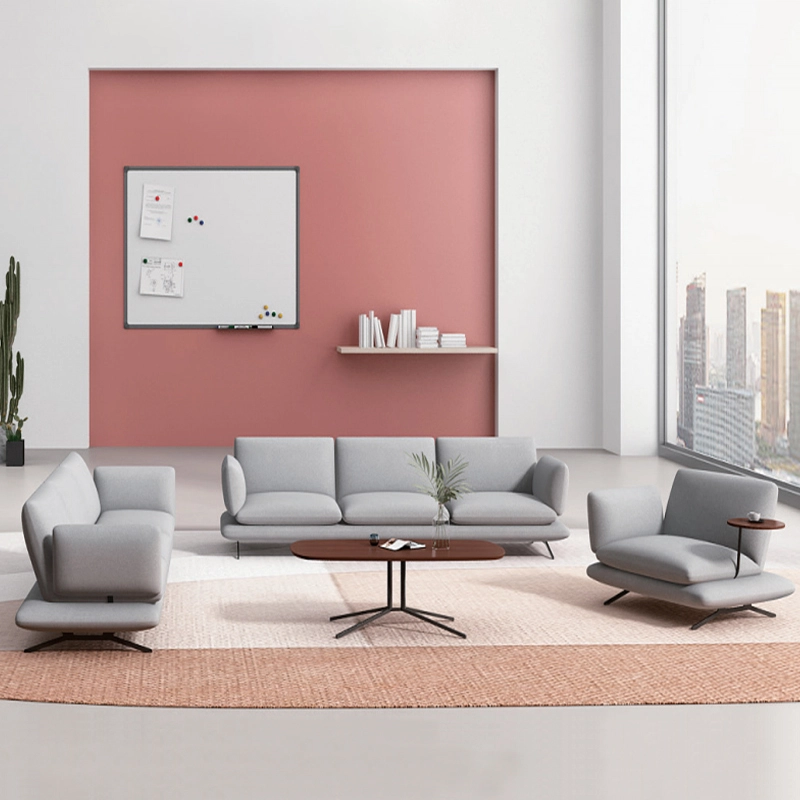
Modern Office Waiting Sofa Set Comfortable Lounge Seating
Customizable sofas, featuring a teddy fabric cover that's durable and stain-resistant. Customizable sizes are also available. This sofa features a sturdy frame and high-quality materials, making it suitable for everyday use. Its versatile design makes it ideal for living rooms, apartments, lounge areas, and even cozy reading nooks. It's more than just a sofa; it's a statement piece for stylish and intelligent living.

MEI YI Furniture × Hotel: Custom Furniture Empowers the Quality Upgrade of a National Hotel Brand
MEI YI Furniture partners with Hotel to deliver custom hotel furniture that combines high-efficiency and durability. This collaboration elevates the quality of a national hotel brand, showcasing MEI YI’s expertise in crafting tailored, long-lasting solutions for High Quality hospitality spaces.
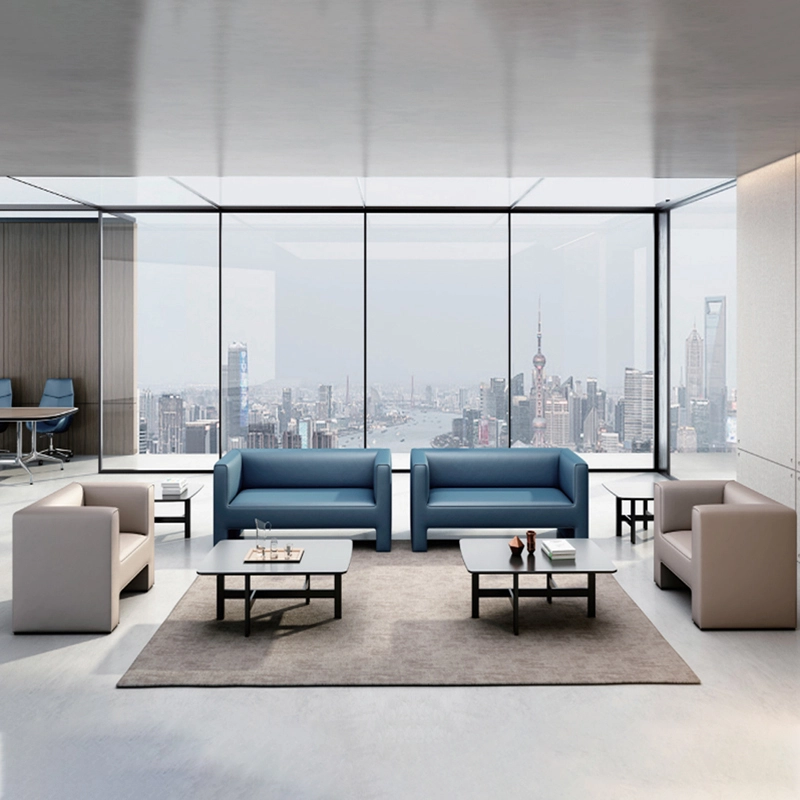
High Quality Wholesale Custom Furniture Waiting Sofa Modern Leisure Sofa
Customizable sofas, featuring a artificial leather cover that's durable and stain-resistant. Customizable sizes are also available. This sofa features a sturdy frame and high-quality materials, making it suitable for everyday use. Its versatile design makes it ideal for living rooms, apartments, lounge areas, and even cozy reading nooks. It's more than just a sofa; it's a statement piece for stylish and intelligent living.
Want to get more of our articles?
Contact one of our sales representatives or fill out this form.
MEI YI Furniture provides a one-stop service for the design, manufacturing, and customization of office, hotel, and school furniture.
Contact: Asya
Email: asya@myofficefurniture.com.cn
WhatsApp: +86 134 2216 1319
Address: No. 25, Nan Street, Jinpan, Zhongluotan Town, Baiyun District, Guangzhou, China.
Whatsapp: +8613422161319
Fackbook
Instagram
YouTube