





Ergonomic Office Workstations to Improve Employee Health
- Designing Healthy Workspaces: The Role of Ergonomic Office Workstations
- Why ergonomic office workstations matter for business performance
- Understanding the problem: what poor office workstations cost
- Key impacts of inadequate workstations
- Core ergonomic principles for office workstations
- 1. Neutral posture and adjustability
- 2. Support and movement
- 3. Visual ergonomics and task lighting
- 4. Fit-for-purpose equipment
- Workstation setups: practical configurations and checklist
- Seated workstation (standard knowledge-worker)
- Sit-stand workstation (roles requiring prolonged computer use)
- Evidence and expected outcomes from ergonomic office workstations
- What employers can expect
- Comparing workstation types: features, benefits and recommended use
- Implementation roadmap: how to deploy ergonomic office workstations at scale
- Phase 1 — Assessment
- Phase 2 — Pilot
- Phase 3 — Rollout
- Cost, value and return on investment (ROI) considerations for office workstations
- Procurement checklist for vendor selection
- MEI YI Furniture: custom solutions for ergonomic office workstations
- MEI YI capabilities and manufacturing strengths
- How MEI YI supports ergonomic office workstation projects
- Specification examples and technical notes for procurement
- User training and behavior change: making furniture work
- Sample micro-break program
- Measuring success: KPIs for ergonomic workstation programs
- Frequently Asked Questions (FAQ)
- 1. What is the ideal height for an office workstation desk?
- 2. Do sit-stand desks actually improve health?
- 3. How should a monitor be positioned on an office workstation?
- 4. What ergonomic accessories should I prioritize?
- 5. How can small businesses implement ergonomic workstations on a budget?
- 6. What certifications or vendor assurances should I look for when buying office workstations?
- Contact and next steps
- References
Designing Healthy Workspaces: The Role of Ergonomic Office Workstations
Why ergonomic office workstations matter for business performance
Poorly designed office workstations are a major, controllable contributor to employee discomfort, musculoskeletal disorders (MSDs), reduced productivity and increased absenteeism. Employers that address workstation ergonomics can expect measurable benefits in worker health and workplace performance. The keyword office workstations appears throughout this article as we describe practical, evidence-based changes that reduce risk and improve comfort for knowledge workers, hybrid staff and frontline office teams.
Understanding the problem: what poor office workstations cost
Before redesigning workstations, leaders need to know the scale and nature of the problem. Musculoskeletal complaints (neck, shoulder, lower back, wrist) are among the most common work-related health issues in office environments. These conditions drive reduced concentration, presenteeism, and time away from work. International occupational health agencies recommend ergonomic interventions, including proper furniture and training, as primary prevention.
Key impacts of inadequate workstations
- Increased prevalence of neck and lower back pain among desk-based employees.
- Lower task performance and higher error rates due to discomfort and fatigue.
- Higher absence and disability claims tied to repetitive strain and MSDs.
- Reduced employee retention and lower engagement when workplaces are perceived as unsupportive.
Core ergonomic principles for office workstations
Good ergonomics adapts the workstation to the person, not the reverse. Adopt these principles as the baseline for office workstation design and procurement.
1. Neutral posture and adjustability
A workstation should allow a neutral posture: relaxed shoulders, elbows close to the body at roughly 90–100 degrees, wrists neutral, thighs parallel to the floor and feet supported. Adjustable chairs, desks, monitor arms and keyboard trays let diverse employees achieve neutral posture.
2. Support and movement
Static positions are harmful. A combination of well-supported sitting, opportunities to stand, and micro-breaks to move reduces load on tissues. Sit-stand workstations and active break protocols are practical ways to increase daily movement without disrupting work.
3. Visual ergonomics and task lighting
Monitors should be positioned to avoid upward or downward neck tilt; top of the screen at or slightly below eye level and at an arm's-length distance. Glare control and adjustable, localized lighting reduce eye strain.
4. Fit-for-purpose equipment
Choose peripherals (keyboards, mice, phone headsets) and furniture that match the tasks and body sizes of users. For example, split keyboards and vertical mice can reduce wrist extension for intensive typists.
Workstation setups: practical configurations and checklist
Below are practical workstation setups that cover common office roles. Each configuration includes quick setup targets you can apply during a workstation assessment or rollout.
Seated workstation (standard knowledge-worker)
- Chair: adjustable height, lumbar support, adjustable armrests, seat depth control.
- Desk: 70–80 cm deep recommended; surface free of clutter for keyboard and documents.
- Monitor: top of screen at or slightly below eye level; 45–70 cm from eyes.
- Keyboard/Mouse: positioned to keep wrists neutral; elbows at 90–100 degrees.
- Foot support: footrest if feet do not rest flat on floor.
Sit-stand workstation (roles requiring prolonged computer use)
- Height-adjustable desk or converter allowing a range suitable for sitting and standing work.
- Monitor height preserved in both positions via adjustable mount or quick-release arm.
- Transition schedule: start with 15–30 minutes standing every hour, gradually increasing standing time based on comfort.
- Anti-fatigue mat for standing to reduce lower-limb fatigue.
Evidence and expected outcomes from ergonomic office workstations
Ergonomic improvements to office workstations have been shown to reduce discomfort, decrease reported musculoskeletal symptoms, and increase worker satisfaction. Interventions combining furniture changes with training and organizational policies (breaks, movement encouragement) deliver stronger and more durable outcomes than furniture alone.
What employers can expect
- Lower self-reported musculoskeletal discomfort within weeks to months, when adjustable furniture and training are provided.
- Improvements in perceived productivity and job satisfaction.
- Potential reductions in short-term absences and workers' compensation claims over time.
Comparing workstation types: features, benefits and recommended use
| Workstation Type | Adjustability | Primary Health Benefit | Best for |
|---|---|---|---|
| Fixed-height desk + ergonomic chair | Low (chair adjustable only) | Basic support; good for short-duration computer tasks | Hot-desk areas, administrative roles |
| Sit-stand desk (electric/manual) | High (height range for sitting/standing) | Reduces total sitting time, encourages movement | Knowledge workers, hybrid staff, long-focus tasks |
| Ergonomic workstation package (chair + monitor arm + keyboard tray) | High (multi-component) | Optimized postural support and task-specific configuration | Power users, design teams, long-duration computer work |
Implementation roadmap: how to deploy ergonomic office workstations at scale
Rolling out ergonomic office workstations across an organization is a program, not a single purchase. Follow a phased, measurable approach:
Phase 1 — Assessment
- Run a survey to identify pain points and high-risk teams.
- Conduct spot workstation assessments using a simple checklist.
Phase 2 — Pilot
- Select representative users for a 3–6 month pilot using sit-stand desks + ergonomic training.
- Measure user comfort, utilization, and impact on work (surveys, qualitative feedback).
Phase 3 — Rollout
- Procure furniture with documented specifications and warranties.
- Provide short ergonomics training and clear guidance on sit-stand usage and micro-breaks.
- Monitor outcomes and iterate (replacement cycles, additional accessories).
Cost, value and return on investment (ROI) considerations for office workstations
While ergonomic furniture represents an upfront cost, employers should evaluate total cost of ownership and potential savings from reduced injury claims, fewer lost workdays, and productivity improvements. ROI varies by organization size, baseline risk, and implementation quality. Consider lifetime warranty, repairability, and modular upgrade options when comparing vendors.
Procurement checklist for vendor selection
- Certifications (e.g., ISO manufacturing standards, formal material safety grades).
- Evidence of quality control and inspection processes.
- Warranty length and scope (parts and mechanisms for height-adjustable desks).
- Availability of customization (size, finishes, integrated cable management).
- After-sales support: maintenance, spare parts, replacement cycle.
MEI YI Furniture: custom solutions for ergonomic office workstations
MEI YI Furniture: Custom Furniture Manufacturer — with 16+ years of experience, MEI YI designs and manufactures High Quality furniture tailored for offices, hotels, schools and healthcare facilities worldwide. Their end-to-end services include design, production, customization and after-sales support, making them a fit-for-purpose partner for organizations planning ergonomic workstation rollouts.
MEI YI capabilities and manufacturing strengths
- Factory scale and expertise: 25,000 m² factory with 100+ professionals and 10+ advanced production lines.
- Production capacity: 20,000+ units per year with ISO/CE/FSC certifications and E1-grade eco-friendly materials.
- Quality control and guarantees: full quality control from raw materials to finished products, OEM/ODM available, 5-year warranty and free CAD/3D design support.
- Global project experience: multilingual team managing international projects from design to delivery.
How MEI YI supports ergonomic office workstation projects
MEI YI offers configurable office furniture packages—adjustable desks, task chairs with lumbar support, monitor arms and integrated cable systems—designed to meet ergonomic guidelines and industry certifications. Their in-house design and production reduce lead times and allow scalable customization for corporate rollouts, co-working spaces and educational institutions.
Specification examples and technical notes for procurement
When specifying office workstations, include measurable attributes in tender documents to avoid surprises. Example technical items to specify:
- Desk height range (e.g., 650–1250 mm for electric sit-stand desks) and lifting capacity (kg).
- Chair adjustments: seat height range, lumbar support depth, armrest adjustability, seat pan depth.
- Materials: E1-grade board or equivalent, metal frame gauge, powder coating standards.
- Certifications: ISO 9001, CE marking (where applicable), FSC certification for wood products.
- Warranty and expected life cycle (recommended 5+ years for intensive office use).
User training and behavior change: making furniture work
Furniture alone won’t deliver optimal outcomes. Train employees on correct adjustments, sit-stand transition protocols and micro-break routines. Short video guides, quick-start cards on each desk, and periodic ergonomic check-ins increase correct usage and satisfaction.
Sample micro-break program
- Every 30 minutes: 30–60 seconds of standing or shoulder/neck stretches.
- Every 60–90 minutes: 5-minute walk or mobility break.
- Encourage team stretch sessions or walking meetings to normalize movement.
Measuring success: KPIs for ergonomic workstation programs
Define and track clear KPIs to evaluate program impact. Useful indicators include:
- Self-reported discomfort scores (baseline vs. post-intervention).
- Utilization metrics for sit-stand desks (if sensors or self-reporting used).
- Number of work-related MSD reports and related absence days.
- Employee satisfaction and perceived productivity surveys.
Frequently Asked Questions (FAQ)
1. What is the ideal height for an office workstation desk?
Ideal desk height depends on user stature and whether sitting or standing. For seated work, desk height typically allows elbows to rest at 90–100 degrees when typing. For sit-stand desks, specify a height range that accommodates both the shortest and tallest users in your organization—commonly 650–1250 mm for electric desks.
2. Do sit-stand desks actually improve health?
Sit-stand desks reduce total sitting time and encourage movement, which can lower discomfort and improve energy levels for some users. The strongest results come when desks are part of a broader program including training and regular movement breaks.
3. How should a monitor be positioned on an office workstation?
The top of the screen should be at or slightly below eye level, about an arm’s length away. Tilt and distance should minimize neck flexion and eye strain; use monitor arms to make adjustments easy.
4. What ergonomic accessories should I prioritize?
Start with an adjustable chair and monitor arm. If employees perform long-duration typing tasks, add a keyboard tray or ergonomic keyboard and a vertical mouse. For sit-stand setups, add an anti-fatigue mat.
5. How can small businesses implement ergonomic workstations on a budget?
Prioritize high-impact changes: adjustable chairs for staff who report discomfort, monitor risers or arms to correct neck posture, and organizational policies to increase movement. Consider phased upgrades and target high-risk teams first.
6. What certifications or vendor assurances should I look for when buying office workstations?
Look for ISO quality management (e.g., ISO 9001), CE marking where applicable, material safety grades (E1 or equivalent for boards), and FSC certification for responsibly sourced wood. Also confirm warranty terms and after-sales support.
Contact and next steps
Ready to upgrade your office workstations? For project inquiries, customization options, CAD/3D design support and factory-direct pricing, contact MEI YI Furniture. Their global team can help specify ergonomic packages—office furniture, hotel furniture and school furniture—aligned to your wellness goals and budget. Request a consultation or view product samples to begin your ergonomic program.
References
- NIOSH (CDC) — Ergonomics and Musculoskeletal Disorders: https://www.cdc.gov/niosh/topics/ergonomics/ (accessed 2025-12-15)
- OSHA — Ergonomics: https://www.osha.gov/ergonomics (accessed 2025-12-15)
- World Health Organization — Occupational health: https://www.who.int/health-topics/occupational-health (accessed 2025-12-15)
- U.S. Bureau of Labor Statistics — Workplace injury and illness overview: https://www.bls.gov/iif/ (accessed 2025-12-15)
- Health and Safety Executive (HSE, UK) — MSDs and workplace guidance: https://www.hse.gov.uk/msd/ (accessed 2025-12-15)
Office Workstations Maintenance and Care Guide
Custom contemporary office furniture Manufacturers and Suppliers in us
Cost-Benefit Analysis: Refurbish vs Replace Hotel Furniture
Contemporary office furniture color and style palettes
Service
Can you handle small orders ?
Of course, in order to support clients' business, We also take small orders.
What's your products range?
1.Whether you need office furniture, home furniture, hotel furniture, school furniture.or special custom furniture products, we can meet your requirements.
2.-Products including office table, office chair, office filing cabinet, office workstation,Office sofa, office reception ,office conference room and so on, Simple Leisure Sets etc.
ls there cheap shipping cost to import to our country?
For small order,express will be best. And for bulk order,sea ship way is best but take much time; For urgent orders,we suggest via air to airport plus our ship partner send to your door. When we calculate the freight for you, we will choose the cheapest,safest express company. lt is the freight company that asks us to pay, so we can not make it cheaper. lf you have your own agent in China, we can send the package to your agent.
Why choose us?
A. Business Type: Furniture Manufacture,Production and export trade experience: Over 15 years Factory area:10000 + square meters Member:>100 staffs Design Team: Minimum 20 pax to organize
B.Customization: Welcome to OEM and ODM or Project.
C.Delivery:15days for 20GP, 25days for 40HQ.
D. Testing center is available in our factory, and regularly through national authoritative organization authoritative authentication, ensure that each product is qualified. E.Competitive price from factory directly.

MEIYI Hotel Full-House Custom Furniture Solutions
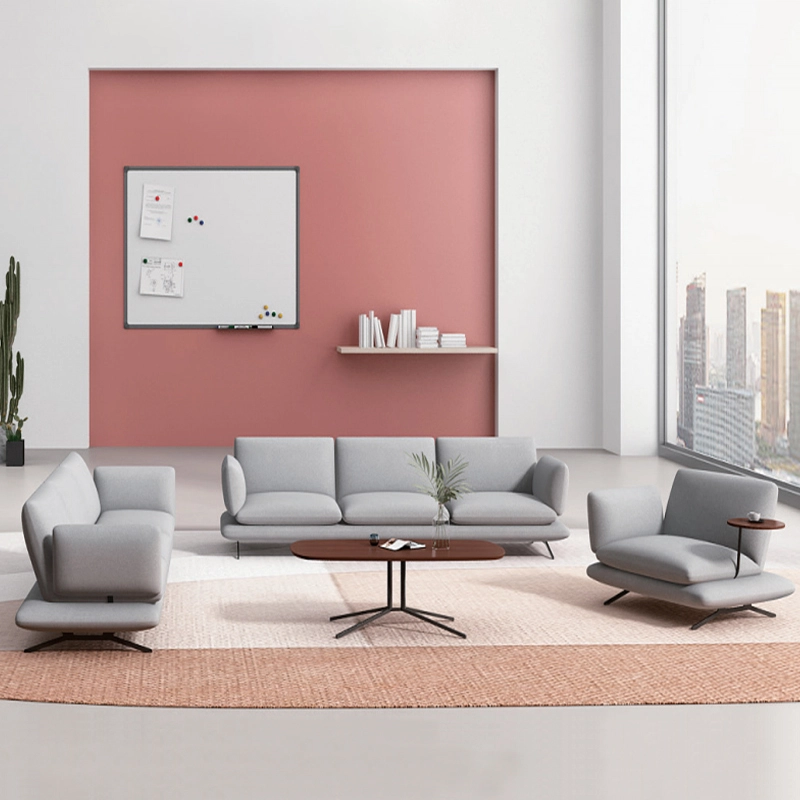
Modern Office Waiting Sofa Set Comfortable Lounge Seating
Customizable sofas, featuring a teddy fabric cover that's durable and stain-resistant. Customizable sizes are also available. This sofa features a sturdy frame and high-quality materials, making it suitable for everyday use. Its versatile design makes it ideal for living rooms, apartments, lounge areas, and even cozy reading nooks. It's more than just a sofa; it's a statement piece for stylish and intelligent living.

MEI YI Furniture × Hotel: Custom Furniture Empowers the Quality Upgrade of a National Hotel Brand
MEI YI Furniture partners with Hotel to deliver custom hotel furniture that combines high-efficiency and durability. This collaboration elevates the quality of a national hotel brand, showcasing MEI YI’s expertise in crafting tailored, long-lasting solutions for High Quality hospitality spaces.
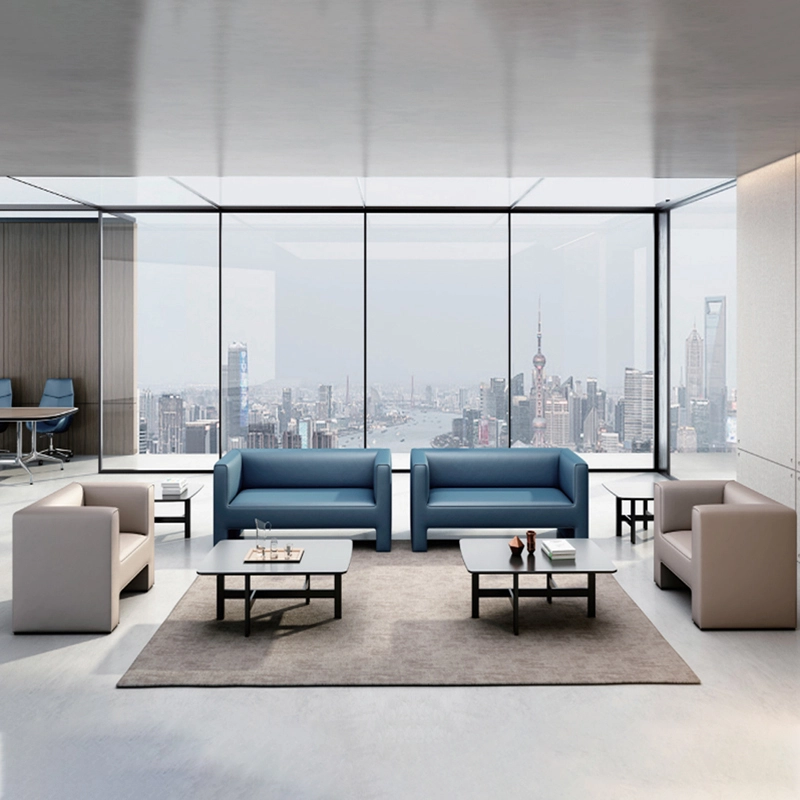
High Quality Wholesale Custom Furniture Waiting Sofa Modern Leisure Sofa
Customizable sofas, featuring a artificial leather cover that's durable and stain-resistant. Customizable sizes are also available. This sofa features a sturdy frame and high-quality materials, making it suitable for everyday use. Its versatile design makes it ideal for living rooms, apartments, lounge areas, and even cozy reading nooks. It's more than just a sofa; it's a statement piece for stylish and intelligent living.
Want to get more of our articles?
Contact one of our sales representatives or fill out this form.
MEI YI Furniture provides a one-stop service for the design, manufacturing, and customization of office, hotel, and school furniture.
Contact: Asya
Email: asya@myofficefurniture.com.cn
WhatsApp: +86 134 2216 1319
Address: No. 25, Nan Street, Jinpan, Zhongluotan Town, Baiyun District, Guangzhou, China.
Whatsapp: +8613422161319
Fackbook
Instagram
YouTube